Photo Editing Prompts
Build reference-photo editing instructions for cinematic portraits, background changes, lighting and wardrobe. Keep identity details, edit constraints and compare four actual fictional before/after pairs.
Twelve original reference-photo tasks
Choose a portrait grade, background, lighting or wardrobe change. Describe your subject and distinguishing features, what to keep, additional requests, exclusions and aspect-ratio intent. Task changes preserve the subject. Build, edit, copy or download plain-text instructions for a separate image editor. This page does not upload photos or generate media.
- Portrait grade · Amber and teal portrait: Apply restrained warm amber highlights and cool teal shadows. Keep believable skin tones, pores and soft highlight detail. Keep: Original lighting direction, outfit, pose, crop and background.
- Portrait grade · Silver monochrome: Convert the image to a balanced neutral monochrome portrait with gentle midtone contrast and detailed shadows. Keep: Original pose, clothing, framing, background and lighting direction.
- Portrait grade · Soft film palette: Use a subtle low-contrast film palette with muted greens, warm neutrals and fine unobtrusive grain. Keep: Skin texture, clothing, pose, light direction and background geometry.
- Background · Quiet library: Replace only the background with softly defocused warm oak library shelves and indistinct books. Keep natural hair edges without halos. Keep: Person's original illumination, clothing, pose, position and scale.
- Background · Overcast garden: Replace only the background with a defocused green garden on an overcast day. Match depth of field and edge softness to the reference. Keep: Person's original illumination, clothing, pose, position and scale.
- Background · Warm studio wall: Replace only the background with a plain matte warm beige studio wall. Keep a soft contact shadow and natural hair edges. Keep: Person's original illumination, clothing, pose, position and scale.
- Lighting · Soft side window: Relight with soft neutral window light from image-left and a gentle shadow on image-right. Keep believable exposure and skin texture. Keep: Outfit, expression, pose, crop and background objects; add no visible window.
- Lighting · Subtle rim light: Add a restrained warm rim light along the image-right hair edge while maintaining soft neutral frontal fill. Avoid glowing outlines. Keep: Clothing, pose, facial detail, framing and background geometry.
- Lighting · Open shade balance: Balance harsh light into soft open-shade illumination, recovering highlight detail while retaining a natural three-dimensional face. Keep: Clothing, pose, expression, crop and background objects.
- Wardrobe · Forest-green blazer: Replace the outfit with a tailored forest-green blazer worn open over an opaque cream high-neck blouse. Use realistic cloth folds and natural hair overlap. Keep: Body proportions, pose, expression, framing, background and original lighting.
- Wardrobe · Linen overshirt: Replace the outer garment with a plain sand-colored linen overshirt over an opaque white crew-neck top. Keep realistic seams and cloth weight. Keep: Body proportions, pose, expression, framing, background and original lighting.
- Wardrobe · Burgundy knit: Replace the top with an opaque burgundy crew-neck knitted sweater, preserving realistic folds and a natural shoulder fit. Keep: Body proportions, pose, expression, framing, background and original lighting.
Edit the attached reference image. Use it as the identity and composition reference, not as a loose inspiration.

Subject to preserve: The same fictional adult in my reference photo: curly dark hair, gray-green eyes and a small cheek mole

Preserve the same facial geometry, eyes, distinguishing marks, age, hairstyle, skin texture and expression. Keep every feature unchanged unless the requested edit explicitly changes it.

Requested edit: Apply restrained warm amber highlights and cool teal shadows. Keep believable skin tones, pores and soft highlight detail.

Also keep unchanged: Original lighting direction, outfit, pose, crop and background

Composition: 4:5 aspect-ratio intent. Preserve the subject's position and scale; configure actual output dimensions in the editing tool.

Avoid: Facial reshaping, beauty smoothing, extra people, text, logos or watermarks

Make one edited image. Inspect facial details, edge transitions, light direction and clothing after generation; reference instructions cannot guarantee identical pixels or identity.
Four actual before/after tests
One AI-generated fictional adult portrait was used as the same reference for four independent edits using OpenAI's built-in image generation tool, reviewed 18 October 2026. These are saved generated-image edits, not real-person photos. The other eight templates have not been rendered. We visually checked requested change and recognizable face, clothing and pose; no biometric identity score or pixel equivalence is claimed. The grade also changes apparent edge lighting, and fine hair/fabric details are regenerated.
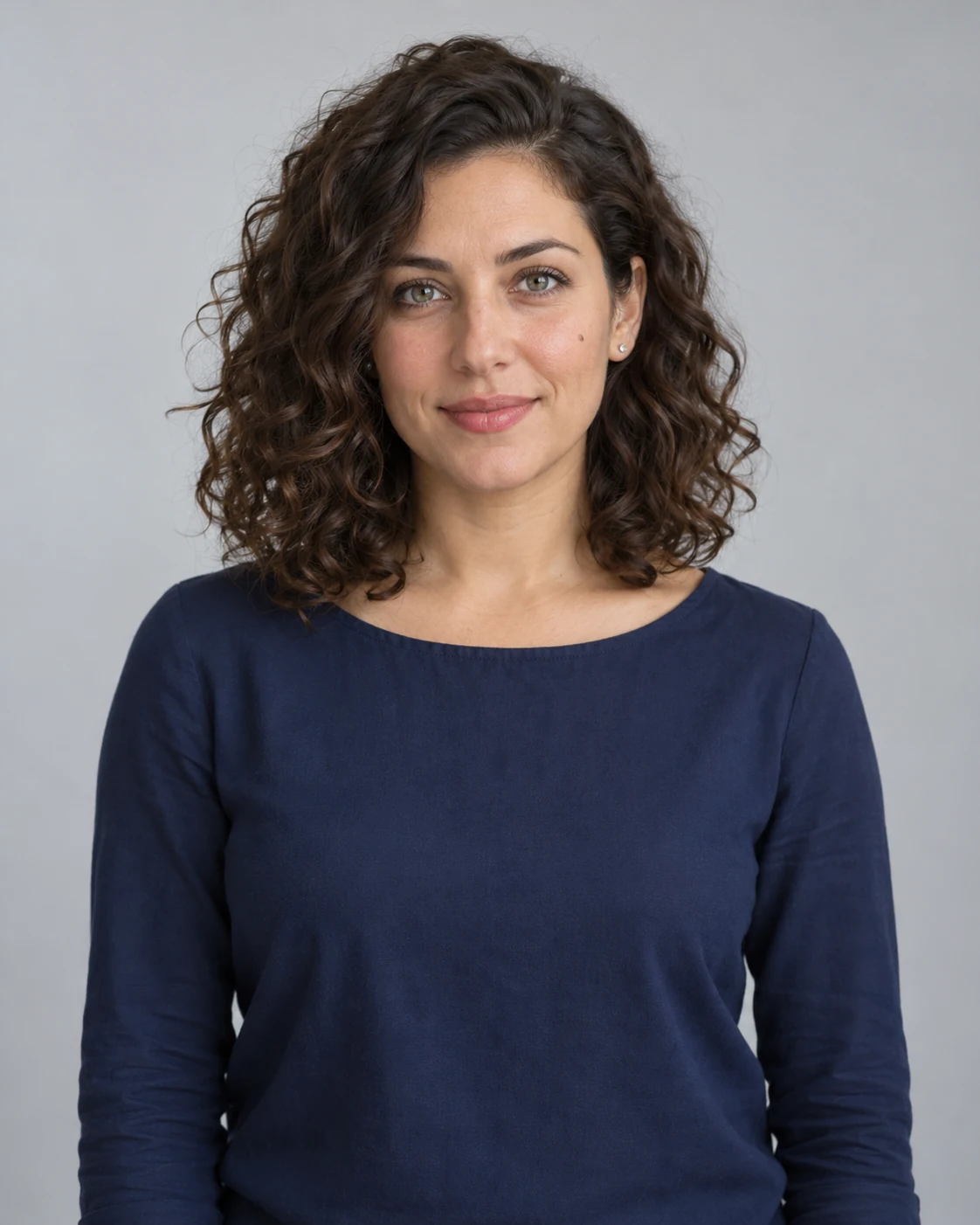
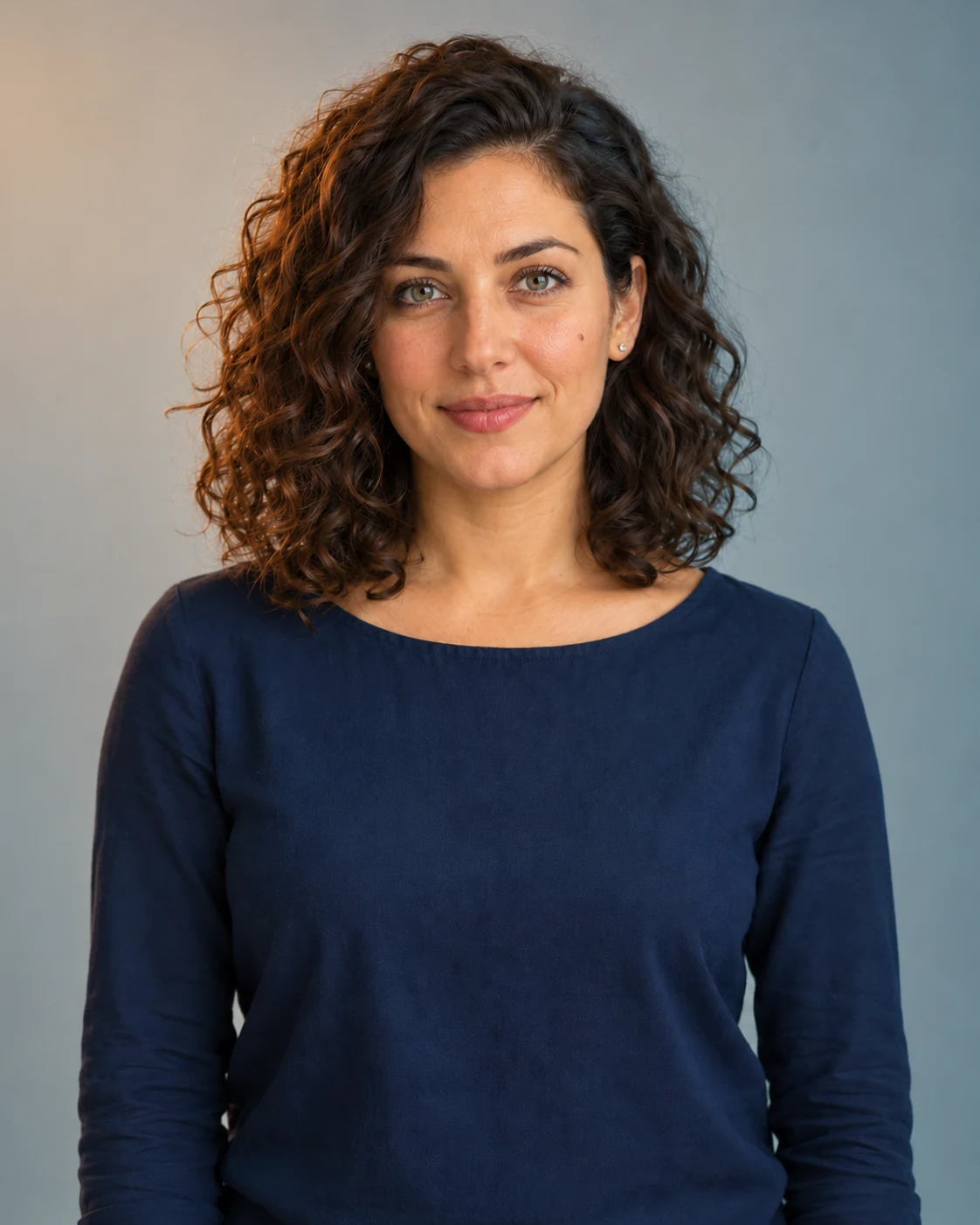
Exact tested edit prompt
Edit the provided fictional adult portrait. Change only the photographic color grade to a restrained cinematic warm-amber highlight and cool-teal shadow look. Keep skin tones believable, preserve pores, and retain soft highlight detail. Preserve the same person: facial geometry, gray-green eyes, mole, age, curly hair, earrings and expression. Preserve the navy blouse, exact pose, framing, light-gray studio background and all objects. Keep the direction and softness of the existing light; this is a color-grade demonstration, not a new scene. Output one 4:5 vertical photorealistic image. No facial reshaping, beauty smoothing, added makeup, extra people, writing, logos or watermark.
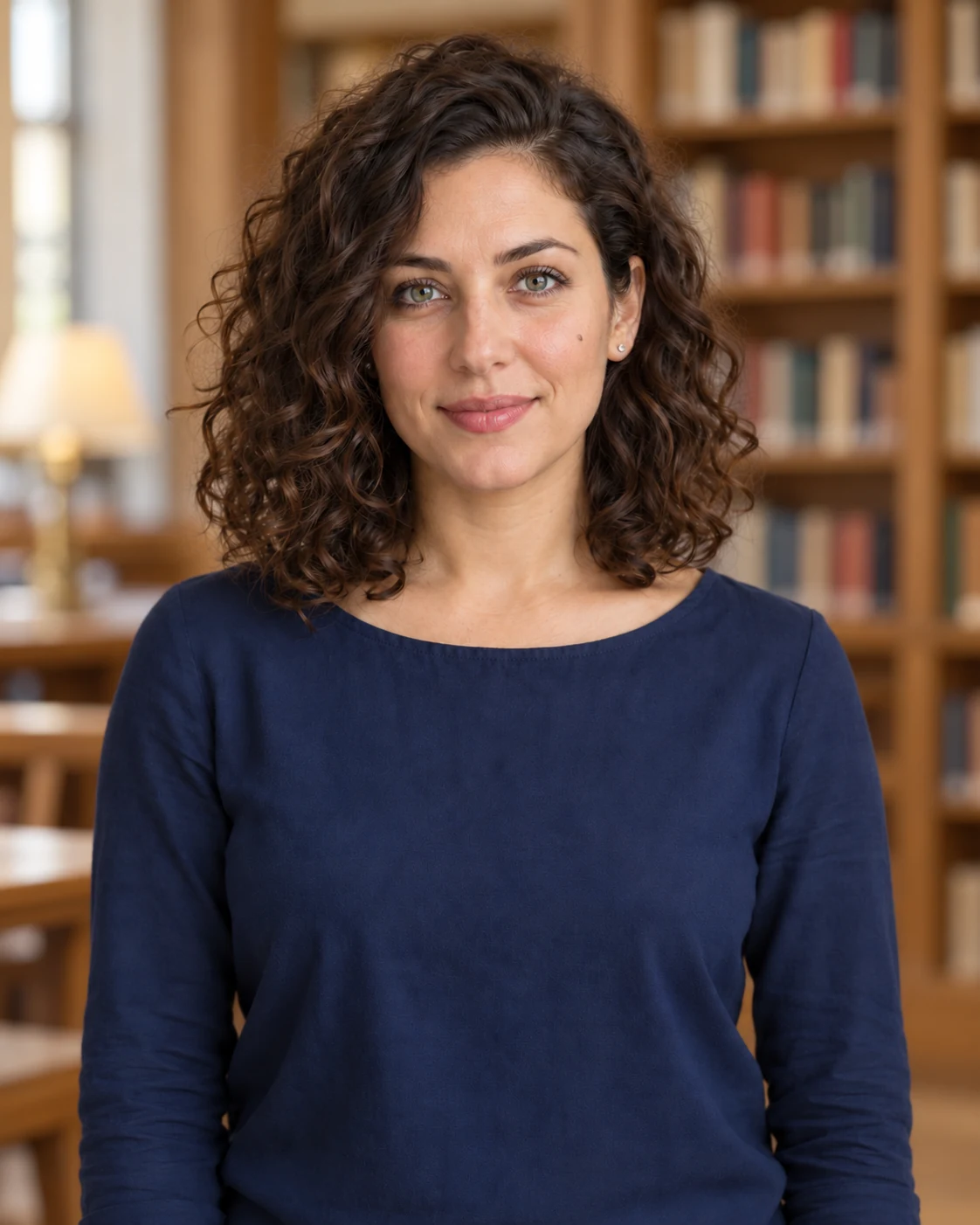
Exact tested edit prompt
Edit the provided fictional adult portrait. Replace only the plain gray background with a softly defocused, quiet library interior: warm oak shelves with indistinct books and gentle neutral daylight, no readable book titles. Keep the person at exactly the same position and scale. Preserve the same face, facial geometry, gray-green eyes, cheek mole, age, curly dark hair, earrings, expression, navy blue blouse, pose and framing. Preserve the original soft neutral illumination and realistic skin texture. Carefully retain natural hair edges without halos; do not cut off the head or shoulders. Output one 4:5 vertical photorealistic image. No facial reshaping, beauty smoothing, wardrobe changes, additional people, writing, logos or watermark.
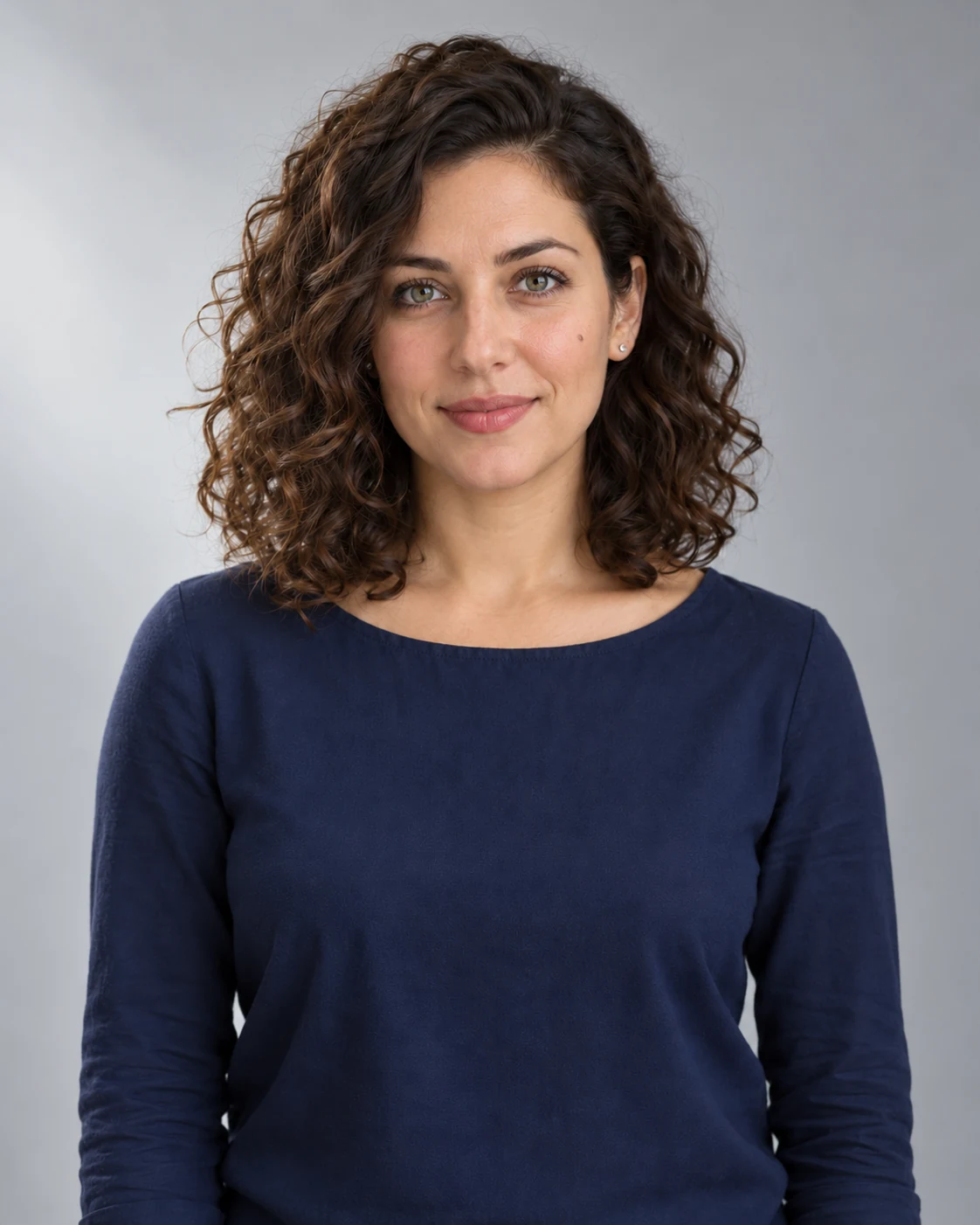
Exact tested edit prompt
Edit the provided fictional adult portrait. Change only the lighting to soft directional window light coming from image-left, with a gentle natural shadow on the image-right side of her face and a subtle falloff across the gray background. Keep the same neutral daylight color balance, believable exposure and skin texture. Preserve the same person: face geometry, gray-green eyes, cheek mole, age, dark curly hair, silver stud earrings and expression. Preserve her navy blouse, exact pose and 4:5 vertical waist-up framing. Keep the background plain light gray; no visible window, props or scenery. Output one photorealistic image. No facial reshaping, makeup change, beauty smoothing, new clothes, extra people, writing, logos or watermark.

Exact tested edit prompt
Edit the provided fictional adult portrait. Change only her wardrobe: replace the plain navy cotton blouse with a tailored forest-green single-breasted blazer worn over a plain cream high-neck blouse. Keep clothing modest, fully opaque, naturally fitted and realistically textured; the blazer is open with simple unlabeled buttons. Preserve the exact same face, facial geometry, gray-green eyes, cheek mole, age, dark curly hair, silver stud earrings and expression. Preserve her body proportions, pose, gray studio background, soft neutral lighting and 4:5 vertical waist-up framing. Keep hair overlapping the new lapels naturally. Output one photorealistic image. No facial reshaping, beauty smoothing, changed hairstyle, extra jewelry, extra people, writing, logos or watermark.
Reference editing, limits and search names
Attach the reference in your chosen editor, request one change at a time, then compare eyes, facial marks, hair edges, clothing and shadows. Preservation instructions cannot guarantee exact identity or unchanged pixels. Set actual dimensions and reference controls in your editor.
If you arrived via searches such as “vikas editor”, “mera prompt” or “prompt ayesha”, this is an independent FreeKitBox workbench with original templates. It claims no affiliation, official service access or integration with those names.